Table Of Content
- The Engineering of EV Neutral & Step-by-Step Guide
- Model-Wise Shifts: How to Trigger Neutral Across the Lineup
- For Vehicles with Physical Gear Stalks (Older Model 3 & Model Y)
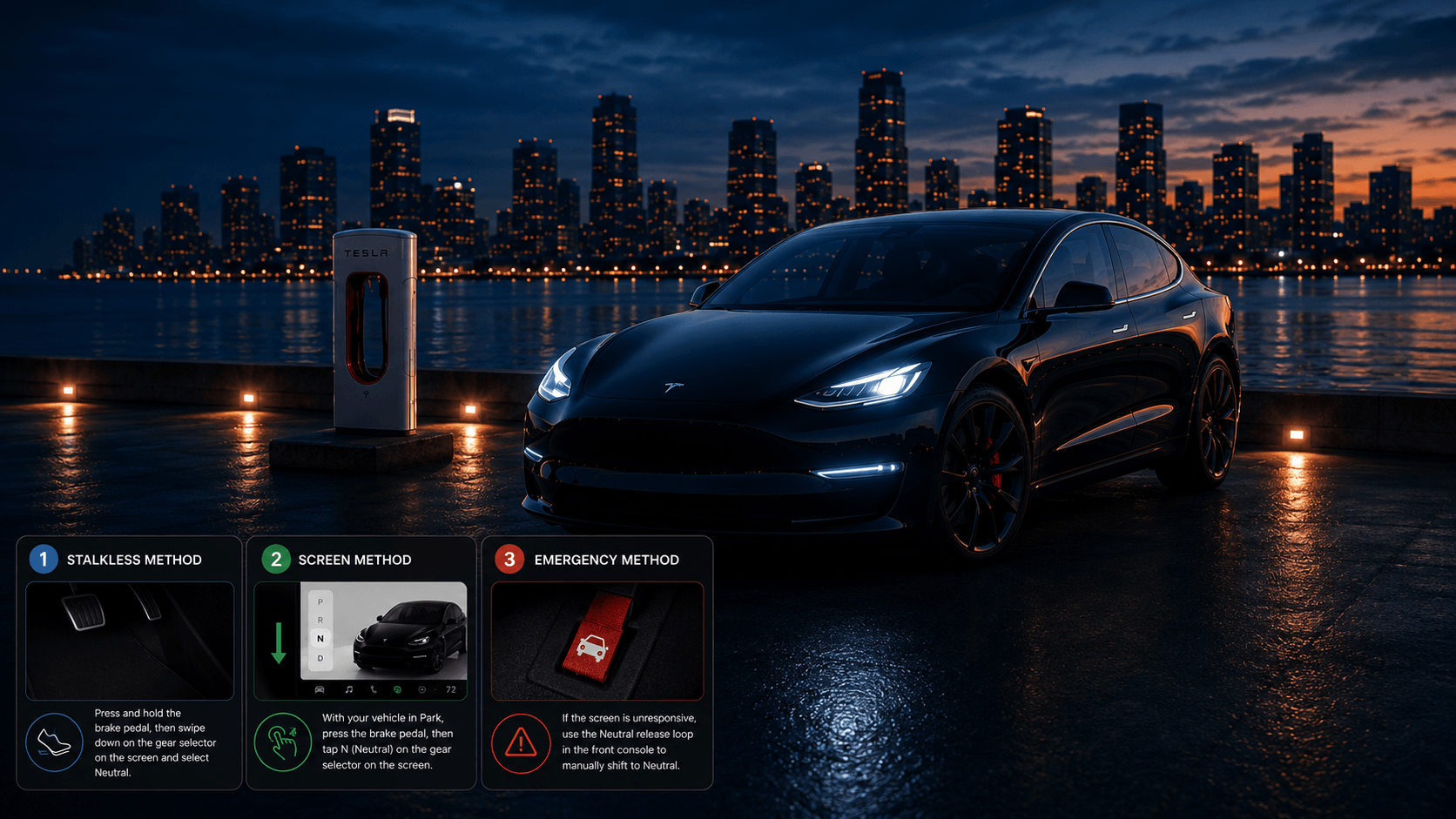
- For Vehicles Without Stalks (Model 3 Highland, Model Y Juniper, Modern S & X)
- For the Cybertruck (and Stalkless Overhead Backup Arrays)
- 10 Operational Advantages of Using Tesla’s Neutral Mode
- Official Directives from Tesla Website & Service Engineering
- The 5 Verification Signs: Confirming Your Tesla is in Neutral
- Crucial Boundaries: When to Use vs. When Not to Use Neutral
- When You Should
- When You Absolute Should NOT (The Car Wash Trap)
- 15 Technical FAQs on Tesla Neutral Mode
How to Put a Tesla in Neutral: The Stalkless, Screen, and Emergency Guide
Shifting a traditional gas car into Neutral is an afterthought, you simply bump a mechanical lever forward. In a software-defined electric vehicle like a Tesla, however, there is no physical transmission linkage. Shifting gears means sending a digital command to the inverter to cut current to the electric motors while keeping the electronic parking brakes from locking up.
The Engineering of EV Neutral & Step-by-Step Guide
In a gas car, Neutral physically disconnects the engine from the wheels. In a Tesla, the electric motors are permanently geared to the axles. There is no clutch to sever that connection.
When you shift a Tesla into Neutral (N), the computer cuts off all electrical current to the stator coils inside the motor. This allows the rotor to spin freely without magnetic resistance or regenerative braking drag, while simultaneously holding the rear electronic parking brake calipers open.
Step-by-Step Guide: The Two Mechanical Ecosystems
TESLA GEAR INTERFACE GENERATIONS
STALK ARCHITECTURE (Older Model 3/Y, Legacy S/X)
-> Uses physical steering column lever
↓
STALKLESS ARCHITECTURE (Highland, Juniper, Cybertruck, Modern S/X)
-> Uses screen swipe strip & roof capacitive console buttons.
Model-Wise Shifts: How to Trigger Neutral Across the Lineup
For Vehicles with Physical Gear Stalks (Older Model 3 & Model Y)
- Bring the vehicle to a complete stop or ensure you are rolling below 5 mph.
- Press down on the brake pedal.
- Push the right-hand steering column gear stalk upward halfway (to the first pressure detent) and hold it there firmly for 1 to 2 seconds.
- Watch for the letter “N” to illuminate in orange on your screen.
For Vehicles Without Stalks (Model 3 Highland, Model Y Juniper, Modern S & X)
- Ensure the vehicle is stationary and your foot is flat on the brake pedal.
- Look at the left edge of your central touchscreen display where the vertical Drive Strip sits.
- Tap the three dots (…) or menu button at the center of that drive strip to open the full P-R-N-D selector sub-menu.
- Tap the “N” (Neutral) icon.
For the Cybertruck (and Stalkless Overhead Backup Arrays)
If your main touchscreen goes black or freezes, you must use the physical overhead backup panel:
- Press the brake pedal down firmly.
- Look up at the overhead ceiling console (located between the sun visors near the hazard light button).
- Tap the panel once to illuminate the capacitive letters.
- Press and hold the “N” button for roughly 2 seconds until it glows bright white.
10 Operational Advantages of Using Tesla’s Neutral Mode
- Enables Safe Mechanical Car Wash Trailing: Allows the car to ride automated conveyor tracks smoothly without tire friction.
- Facilitates Emergency Roadway Rolling: Allows police or good Samaritans to physically push a disabled vehicle out of live traffic lanes.
- Optimizes Precision Wheel Alignments: Gives alignment technicians the ability to spin individual wheels freely during sensor tracking.
- Safely Loads Flatbed Tow Trucks: Allows winches to pull the car up a flatbed ramp without damaging the electronic parking brakes.
- Enables Manual Garage Positioning: Allows you to roll the car forward or backward a few inches at home manually without turning on climate or driving profiles.
- Eliminates High-Voltage Surge Risk During Shoving: Isolates inverter channels so manual pushing doesn’t generate damaging inductive spikes.
- Bypasses Dynamic Regenerative Drag: Useful for diagnostic technicians trying to coast and isolate purely mechanical wheel bearing sounds.
- Protects Delicate Low-Clearance Rims: Prevents tires from scraping against automated alignment guides by allowing completely natural tracking.
- Allows Safe Ferry and Transport Tiedowns: Keeps the brakes released briefly if transit operators need to make manual deck adjustments.
- Simplifies Brake Rotor Resurfacing Diagnostics: Allows service centers to freely rotate assemblies to calculate brake runout metrics.
Official Directives from Tesla Website & Service Engineering
According to official Tesla service documentation, Neutral is designed strictly for short-duration, low-speed, supervised maneuvers.
- The Seat Sensor Safety Trap: Tesla’s engineering web logs state that standard Neutral relies heavily on occupant presence. The moment the driver lifts their weight off the seat cushion or unbuckles their seatbelt while in standard Neutral, the car interprets this as an accidental exit and automatically shifts into Park.
- The Destruction Warning: Tesla Service issues an absolute warning: Never tow a Tesla with the wheels touching the ground in Neutral. Because the motors are permanently connected, rolling at highway speeds will turn the motors into high-voltage generators. Since the car’s computer cooling networks are offline during a tow, this unmanaged electrical generation (back-EMF) will quickly melt the inverter electronics and ruin the battery.
The 5 Verification Signs: Confirming Your Tesla is in Neutral
Before you let go of the steering wheel or allow a car wash track to pull your vehicle, look for these five absolute signs:
- The Orange Header Icon: The letter “N” on your central touchscreen or instrument panel will glow in a clear orange color, while the P, R, and D letters turn gray.
- The Zero-Resistance Roll Test: If you ease your foot off the brake pedal on a slight inline surface, the car will immediately begin rolling slowly with zero drivetrain resistance.
- The Absent Power-Meter Bar: The black/green power consumption bar on the screen disappears entirely, indicating no current is going to or from the motors.
- The Mechanical Brake Release: You will hear a distinct, faint acoustic sound of electrical actuators moving behind the rear wheels as the parking brake pads pull back.
- The Absence of Creep/Hold Labels: The screen status will drop the “HOLD” icon, indicating the vehicle is completely free-wheeling.
Crucial Boundaries: When to Use vs. When Not to Use Neutral
When You Should
- When a vehicle assembly line or maintenance technician needs to roll the car back onto a service lift track.
- When your vehicle has stalled due to a low-voltage issue and must be safely winched up a flatbed tow truck ramp (using Transport Mode).
When You Absolute Should NOT (The Car Wash Trap)
- Never use standard Neutral at a drive-through automatic car wash if you plan to step out of the car. If you leave the seat, the car will shift to Park, and the moving track will rip into your tires or wheels. For these scenarios, you must use Car Wash Mode and select “Enable Free Roll,” which overrides the seat sensor lock.
- Never coast down long mountain declines in Neutral to try and “save energy.” This is dangerous because it eliminates your regenerative braking safety net, forcing your mechanical brakes to overheat, while actually yielding less efficiency than driving normally.
15 Technical FAQs on Tesla Neutral Mode
Yes, it is physically possible by holding the gear stalk up or utilizing the touchscreen drive menu. The car will immediately cut motor power and coast freely. To regain power, simply pull the stalk down into Drive or swipe up on the screen strip.
This is a built-in anti-roll safety layer. The car’s computer assumes you are exiting the vehicle; to prevent an accidental runaway roll, it automatically engages the rear electronic parking brakes.
You cannot do this in standard Neutral. You must go to Controls > Service > Car Wash Mode and tap Enable Free Roll. This is the only software loop that keeps the parking brakes released when the driver leaves the cabin.
Standard Neutral is for a live car with an occupant. Transport Mode (Controls > Service > Towing) is an emergency setting designed to keep the brakes released while winching a completely dead or malfunctioning Tesla onto a flatbed truck.
No. Shifting into Neutral tells the power inverters to ignore the rotation of the wheels. No kinetic energy will be harvested or returned to the battery pack while coasting in Neutral.
Yes. The drive select strip is given high priority by the vehicle’s processor. However, if the screen is completely black or frozen, you must rely on the backup capacitive P-R-N-D keys located near the hazard light button.
Yes, if left in Neutral for hours. Neutral keeps the contactors open and prevents the main high-voltage pack from actively charging the low-voltage battery, which can eventually drain the auxiliary cell.
Press and hold the “N” button on the overhead capacitive console (near your rearview mirror) for 2 seconds. This bypasses the screen completely and commands the brakes to release so the car can be pushed to safety.
Only if the vehicle is already moving slowly. If the car is completely stationary in Park, the safety software requires a physical, firm press on the brake pedal before it will authorize a shift into Neutral.
A blinking “N” indicates that the shift request was rejected by the vehicle control unit. This usually happens because you didn’t hold the stalk long enough or your foot wasn’t pressing the brake pedal firmly down.
Yes. Valet Mode caps top speed and locks your private data, but it keeps all basic driving gear selections (Park, Reverse, Neutral, and Drive) completely functional for the attendant.
No. Shifting into Neutral releases all braking pressures completely, allowing the wheels to roll freely. No brake pads or rotors are worn down during a neutral roll.
The car will safely drop all motor torque and enter a coasting state. It will not lock up the tires or cause a mechanical skid, as the wheels are still permitted to rotate freely.
Yes, but because the Cybertruck uses an advanced Steer-by-Wire system, the auxiliary low-voltage power must be fully functional for the steering wheel to turn the front and rear wheels while rolling.
Simply tap your foot on the brake pedal and pull your gear stalk down into Drive (or swipe upward on the touchscreen drive strip). The car will instantly re-engage the electric motors.
Spread Some Love
Author